Menu Close

Category: at risk records

At Risk Records are archival records that are in danger of being lost forever, usually due to physical damage or (in the case of electronic records) loss of the ability to access the originals.

Why Preserve? To Connect!

In honor of 2025’s World Digital Preservation Day (WDPD), I am finally taking a leap back into posting here. My last post was in February of 2020 – and while I can see a half-dozen partially written posts lurking behind the scenes, none of them were ever finished “enough” to actually post.

So… Happy World Digital Preservation Day! I just spent the last 4 days attending iPRES 2025 virtually. I was in Maryland while most of the attendees were in person on the other side of the planet in New Zealand. Luckily, I’m a night owl, so attending sessions from 3pm – 10:30pm my time was just fine with me.

The conference closed last night (still Wednesday) for me – but now I’ve caught up to Thursday November 6th and have the time to reflect on this year’s WDPD theme of “Why Preserve?”. Please keep in mind that the contents of this post, along with everything here on Spellbloundblog, reflect only my thoughts as an individual.

First, some context about me. I love stories and I love connection of all kinds – connections among people, connections between the past and all our possible futures, and connections that build community. Somewhere at their intersection is where I see the role for preservation. Without our digital records (preserved in such a way that they retain their context, can be trusted to be authentic, and can be interacted with in a meaningful way) we will lose stories of the past and all the evidence they contain. We will lose many kinds of connection.

Many communities have decided that this reason for preserving means that time, energy, and funding should be allocated toward this goal. One of iPRES 2025’s themes was Tūhono (Connect). This thread ran through keynotes, posters, bake-off demonstrations, and presentations/panels of all kinds. And for me – the theme of Tūhono elegantly ties into my understanding of “Why Preserve?”.

We preserve to connect. To connect the past to the future. To connect with both our professional digital preservation community and with those whose records are being preserved. Digging into my copious notes from the last few days, here are a few tidbits from iPRES 2025 that kept the focus on connection.

  • Late Sunday my time, I attended a workshop on Archival Resource Keys (ARKs). The ARK Alliance is a community that supports the ARK infrastructure. ARKs and the ARK Alliance are all about connection. ARKs are being used by libraries, archives, museums, government agencies, and more. From their website “ARKs are open, mainstream, non-paywalled, decentralized persistent identifiers that you can start creating in under 48 hours.” Want to connect your stuff to anyone who wants to refer to it in a durable way? ARKs can help.
  • Tuesday paper session 2 included a paper on “A Collaborative Framework for Migrations”, talking about digital preservation in Finland. The presenters highlighted that collaboration was key to success. Cultural institutions are experts in semantics and understanding while the digital preservation service is responsible for bit-level preservation, but you need both to ensure logical preservation. Without that collaboration, you can’t ensure the future usability of the information.
  • Wednesday’s keynote on “Encountering Collapse: Power, Community, and the Future of Open Infrastructure” was delivered by Rosalyn Metz, Chief Technology Officer for Libraries and Museum at Emory University. There were so many compelling elements to this talk, but I’ll share the one that spoke to me most strongly of connection. Community is the backbone of open infrastructure: “The resilience of infrastructure depends on the relationships that sustain it. Communities, not technologies, make infrastructure possible.”.
  • I spent pretty much all day Wednesday in the Bake-Offs, in which people demo tech tools and solutions. To my eye, it was a fantastic parade of people sharing. So many opportunities for speakers to literally demonstrate their expertise. I always love seeing what other folks are working on, especially open source projects that might be just the thing someone needs to move their own project forward. It’s like speed dating for future collaboration.
  • I saw many posters and lightening talks – but one that jumps out as fitting this theme was presented by Amy Pienta, Research Professor at ICPSR at University of Michigan. She spoke about the role of data stewards in safeguarding public data. DataLumos is a great example of a community coming together to ensure crucial resources are preserved. I’m glad that they exist, doing the work — and perhaps serving as inspiration for others to work on whatever challenges they find.
  • The closing keynote address from Peter-Lucas Jones, CEO of Te Hiku Media, specifically was tied to the conference theme of Connect. In order to understand traditional data, you must understand the importance of indigenous language. The efforts of Te Hiku Media include multiple ways of leveraging technology to both preserve the Māori language and give back to the community keeping the language alive (a few examples: teaching computers te reo Māori, creating a synthentic voice that can run on assistive devices and speaks te reo Māori, live bi-lingual captioning). He also emphasized that it was important to “empower communities to lead the change they need” – and that data licensing is key to prevent that what they are creating can only be used for purposes in sync with the communities wishes.
  • The last session I attended was Panel 7: “Working with ICT in Digital Preservation”. My connection thread from this panel discussion was the need for all of us to support one another as we navigate the multi-fold challenges to building the technical environments we need to preserve at-risk records. Yes, we do need to plug in old tech bought off ebay to see if it will work (and hope it won’t catch fire!). Yes, we need to leverage other teams’ success and use it as a “hey it worked for them” kind of argument to help us go around institutional rules that are keen on standardization. And yes – we need to connect with as many parts of our organizations to explain what digital preservation work is, how we do it, and why it is important.

This list is far from exhaustive, but I hope it gives you a taste of why the strongest thread for me from iPRES 2025 was connection. And why that is also my answer to “Why Preserve?”. To Connect.

PS: I’d like to thank the Web Hypertext Application Technology Working Group (WHATWG) who apparently created this fantastically useful named character reference list of all the character names that HTML recognizes so that I could appropriately publish two of the words I wanted to in this post accurately (Tūhono and Māori) via the WordPress text HTML interface. If you are curious, the answer to making the characters ū and ā display is preceding the strings umacr; and amacr; with an &. Yes, I needed the help of a community to share my ideas on connection.

Chapter 10: Open Source, Version Control and Software Sustainability by Ildikó Vancsa


Chapter 10 of Partners for Preservation is ‘Open Source, Version Control and Software Sustainability’ by Ildikó Vancsa. The third chapter of Part III:  Data and Programming, and the final of the book, this chapter shifts the lens on programming to talk about the elements of communication and coordination that are required to sustain open source software projects.

When the Pacific Telegraph Route (shown above) was finished in 1861, it connected the new state of California to the East Coast. It put the Pony Express out of business. The first week it was in operation, it cost a dollar a word. Almost 110 years later, in 1969, saw the first digital transmission over ARPANET (the precursor to the Internet).

Vancsa explains early in the chapter:

We cannot really discuss open source without mentioning the effort that people need to put into communicationg with each other. Members of a community must be able to follow and track back the information that has been exchanged, no matter what avenue of communication is used.

I love envisioning the long evolution from the telegraph crossing the continent to the Internet stretching around the world. With each leap forward in technology and communication, we have made it easier to collaborate across space and time. Archives, at their heart, are dedicated to this kind of collaboration. Our two fields can learn from and support one another in so many ways.

Bio:

Ildikó Vancsa started her journey with virtualization during her university years and has been in connection with this technology in different ways since then. She started her career at a small research and development company in Budapest, where she focused on areas like system management, business process modeling and optimization. Ildikó got involved with OpenStack when she started to work on the cloud project at Ericsson in 2013. She was a member of the Ceilometer and Aodh project core teams. She is now working for the OpenStack Foundation and she drives network functions virtualization (NFV) related feature development activities in projects like Nova and Cinder. Beyond code and documentation contributions, she is also very passionate about on-boarding and training activities.

Image source: Route of the first transcontinental telegraph, 1862.
https://commons.wikimedia.org/wiki/File:Pacific_Telegraph_Route_-_map,_1862.jpg

Chapter 4: Link Rot, Reference Rot and the Thorny Problems of Legal Citation by Ellie Margolis

The fourth chapter in Partners for Preservation is ‘Link Rot, Reference Rot and the Thorny Problems of Legal Citation’ by Ellie Margolis. Links that no longer work and pages that have been updated since they were referenced are an issue that everyone online has struggled with. In this chapter, Margolis gives us insight into why these challenges are particularly pernicious for those working in the legal sphere.

This passage touches on the heart of the problem.

Fundamentally, link and reference rot call into question the very foundation on which legal analysis is built. The problem is particularly acute in judicial opinions because the common law concept of stare decisis means that subsequent readers must be able to trace how the law develops from one case to the next. When a source becomes unavailable due to link rot, it is as though a part of the opinion disappears. Without the ability to locate and assess the sources the court relied on, the very validity of the court’s decision could be called into question. If precedent is not built on a foundation of permanently accessible sources, it loses
its authority.

While working on this blog post, I found a WordPress Plugin called Broken Link Checker. It does exactly what you expect – scans through all your blog posts to check for broken URLs. In my 201 published blog posts (consisting of just shy of 150,000 words), I have 3002 unique URLs. The plugin checked them all and found 766 broken links! Interestingly, the plugin updates the styling of all broken links to show them with strikethroughs – see the strikethrough in the link text of the last link in the image below:

For each of the broken URLs it finds, you can click on “Edit Link”. You then have the option of updating it manually or using a suggested link to a Wayback Machine archived page – assuming it can find one.

It is no secret that link rot is a widespread issue. Back in 2013, the Internet Archive announced an initiative to fix broken links on the Internet – including the creation of the Broken Link Checker plugin I found. Three years later, on the Wikipedia blog, they announced that over a million broken outbound links on English Wikipedia had been fixed. Fast forward to October of 2018 and an Internet Archive blog post announced that More than 9 million broken links on Wikipedia are now rescued.

I particularly love this example because it combines proactive work and repair work. This quote from the 2018 blog post explains the approach:

For more than 5 years, the Internet Archive has been archiving nearly every URL referenced in close to 300 wikipedia sites as soon as those links are added or changed at the rate of about 20 million URLs/week.

And for the past 3 years, we have been running a software robot called IABot on 22 Wikipedia language editions looking for broken links (URLs that return a ‘404’, or ‘Page Not Found’). When broken links are discovered, IABot searches for archives in the Wayback Machine and other web archives to replace them with.

There are no silver bullets here – just the need for consistent attention to the problem. The examples of issues being faced by the law community, and their various approaches to prevent or work around them, can only help us all move forward toward a more stable web of internet links.

Ellie Margolis

Bio:
Ellie Margolis is a Professor of Law at Temple University, Beasley School of law, where she teaches Legal Research and Writing, Appellate Advocacy, and other litigation skills courses. Her work focuses on the effect of technology on legal research and legal writing. She has written numerous law review articles, essays and textbook contributions. Her scholarship is widely cited in legal writing textbooks, law review articles, and appellate briefs.

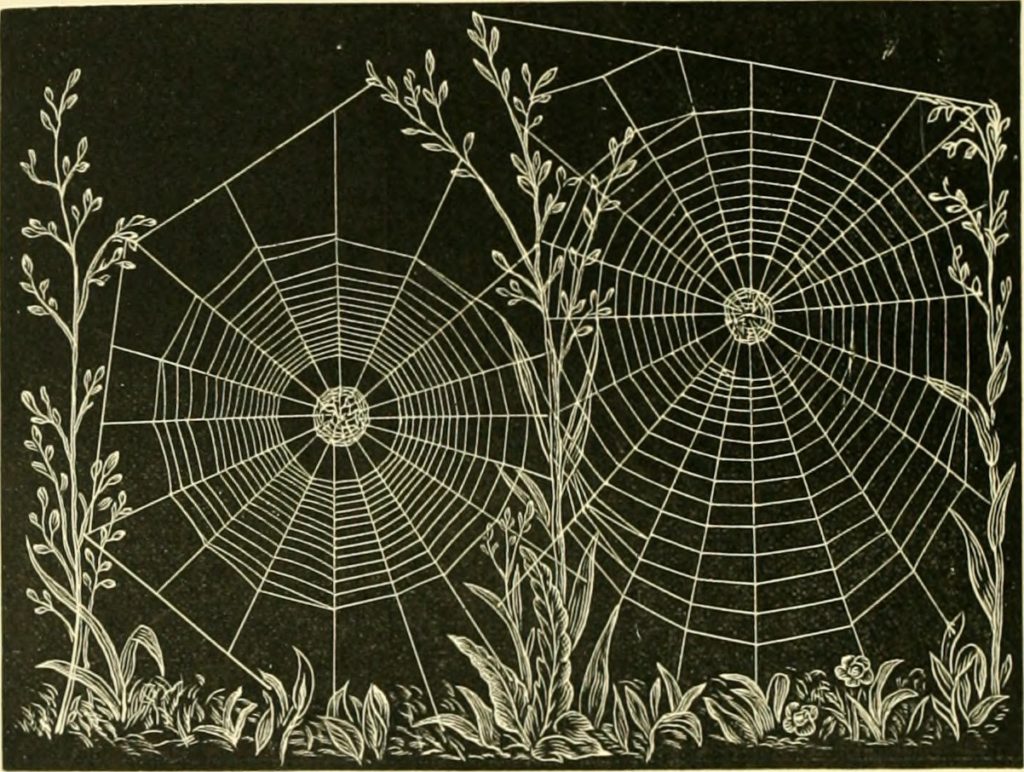
Image credit: Image from page 235 of “American spiders and their spinningwork. A natural history of the orbweaving spiders of the United States, with special regard to their industry and habits” (1889)

UNESCO/UBC Vancouver Declaration

In honor of the 2012 Day of Digtal Archives, I am posting a link to the UNESCO/UBC Vancouver Declaration. This is the product of the recent Memory of the World in the Digital Age conference and they are looking for feedback on this declaration by October 19th, 2012 (see link on the conference page for sending in feedback).

To give you a better sense of the aim of this conference, here are the ‘conference goals’ from the programme:

The safeguard of digital documents is a fundamental issue that touches everyone, yet most people are unaware of the risk of loss or the magnitude of resources needed for long-term protection. This Conference will provide a platform to showcase major initiatives in the area while scaling up awareness of issues in order to find solutions at a global level. Ensuring digital continuity of content requires a range of legal, technological, social, financial, political and other obstacles to be overcome.

The declaration itself is only four pages long and includes recommendations to UNESCO, member states and industry. If you are concerned with digital preservation and/or digitization, please take a few minutes to read through it and send in your feedback by October 19th.

CURATEcamp Processing 2012

CURATEcamp Processing 2012 was held the day after the National Digital Information Infrastructure and Preservation Program (NDIIPP) and the National Digital Stewardship Alliance (NDSA) sponsored Digital Preservation annual meeting.

The unconference was framed by this idea:

Processing means different things to an archivist and a software developer. To the former, processing is about taking custody of collections, preserving context, and providing arrangement, description, and accessibility. To the latter, processing is about computer processing and has to do with how one automates a range of tasks through computation.

The first hour or so was dedicated to mingling and suggesting sessions.  Anyone with an idea for a session wrote down a title and short description on a paper and taped it to the wall. These were then reviewed, rearranged on the schedule and combined where appropriate until we had our full final schedule. More than half the sessions on the schedule have links through to notes from the session. There were four session slots, plus a noon lunch slot of lightening talks.

Session I: At Risk Records in 3rd Party Systems This was the session I had proposed combined with a proposal from Brandon Hirsch. My focus was on identification and capture of the records, while Brandon started with capture and continued on to questions of data extraction vs emulation of the original platforms. Two sets of notes were created – one by me on the Wiki and the other by Sarah Bender in Google Docs. Our group had a great discussion including these assorted points:

  • Can you mandate use of systems we (archivists) know how to get content out of? Consensus was that you would need some way to enforce usage of the mandated systems. This is rare, if not impossible.
  •  The NY Philharmonic had to figure out how to capture the new digital program created for the most recent season. Either that, or break their streak for preserving every season’s programs since 1842.
  • There are consequences to not having and following a ‘file plan’. Part of people’s jobs have to be to follow the rules.
  • What are the significant properties? What needs to be preserved – just the content you can extract? Or do you need the full experience? Sometimes the answer is yes – especially if the new format is a continuation of an existing series of records.
  • “Collecting Evidence” vs “Archiving” – maybe “collecting evidence” is more convincing to the general public
  • When should archivists be in the process? At the start – before content is created, before systems are created?
  • Keep the original data AND keep updated data. Document everything, data sources, processes applied.

Session II: Automating Review for Restrictions? This was the session that I would have suggested if it hadn’t already been on the wall. The notes from the session are online in a Google Doc. It was so nice to realize that that challenge of review of records for restricted information is being felt in many large archives. It was described as the biggest roadblock to the fast delivery of records to researchers. The types of restrictions were categorized as ‘easy’ or ‘hard’. The ‘Easy’ category was for well defined content that follow rules that we could imagine teaching a computer to identity — things like US social security numbers, passport numbers or credit card numbers. The ‘Hard’ category was for restrictions that had more human judgement involved. The group could imagine modules coded to spot the easy restrictions. The modules could be combined to review for whatever set was required – and carry with them some sort of community blessing that was legally defensible. The modules should be open source. The hard category likely needs us as a community to reach out to the eDiscovery specialists from the legal realm, the intelligence community and perhaps those developing autoclassification tools. This whole topic seems like a great seed for a Community of Practice. Anyone interested? If so – drop a comment below please!

Lunchtime Lightning Talks: At five minutes each, these talks gave the attendees a chance to highlight a project or question they would like to discuss with others. While all the talks were interesting, there was one that really stuck with me: Harvard University’s Zone 1 project which is a ‘rescue repository’. I would love to see this model spread! Learn more in the video below.

Session III: Virtualization as a means for Preservation In this session we discussed the question posed in the session proposal “How can we leverage virtualization for large-scale, robust preservation?”. I am not sure if any notes were generated for this session. Notes are available on the conference wiki. Our discussion touched on the potential to save snapshots of virtualized systems over time, the challenges of all the variables that go into making a specific environment, and the ongoing question of how important is it to view records in their original environment (vs examining the extracted ‘content’).

Session IV: Accessible Visualization This session quickly turned into a cheerful show and tell of visualization projects, tools and platforms – most made it into a list on the Wiki.

Final Thoughts
The group assembled for this unconference definitely included a great cross-section of archivists and those focused on the tech of electronic records and archives. I am not sure how many there were exclusively software developers or IT folks. We did go around the room for introductions and hand raising for how people self-identified (archivists? developers? both? other?). I was a bit distracted during the hand raising (I was typing the schedule into the wiki) – but it is my impression that there were many more archivists and archivist/developers than there were ‘just developers’. That said, the conversations were productive and definitely solidly in the technical realm.

One cross-cutting theme I spotted was the value of archivists collaborating with those building systems or selecting tech solutions. While archivists may not have the option to enforce (through carrots or sticks) adherence to software or platform standards, any amount of involvement further up the line than the point of turning a system off will decrease the risks of losing records.

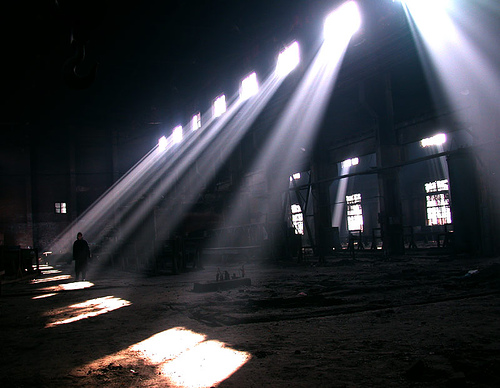
So why the picture of the abandoned factory at the top of this post? I think a lot of the challenges of preservation of born digital records tie back to the fact that archivists often end up walking around in the abandoned factory equivalent of the system that created the records. The workers are gone and all we have left is a shell and some samples of the product. Maybe having just what the factory produced is enough. Would it be a better record if you understood how it moved through the factory to become what it is in the end? Also, for many born digital records you can’t interact with them or view them unless you have the original environment (or a virtual one) in which to experience them. Lots to think about here.

If this sounds like a discussion you would like to participate in, there are more CURATEcamps on the way. In fact – one is being held before SAA’s annual meeting tomorrow!

Image Credit: abandoned factory image from Flickr user sonyasonya.

Rescuing 5.25″ Floppy Disks from Oblivion

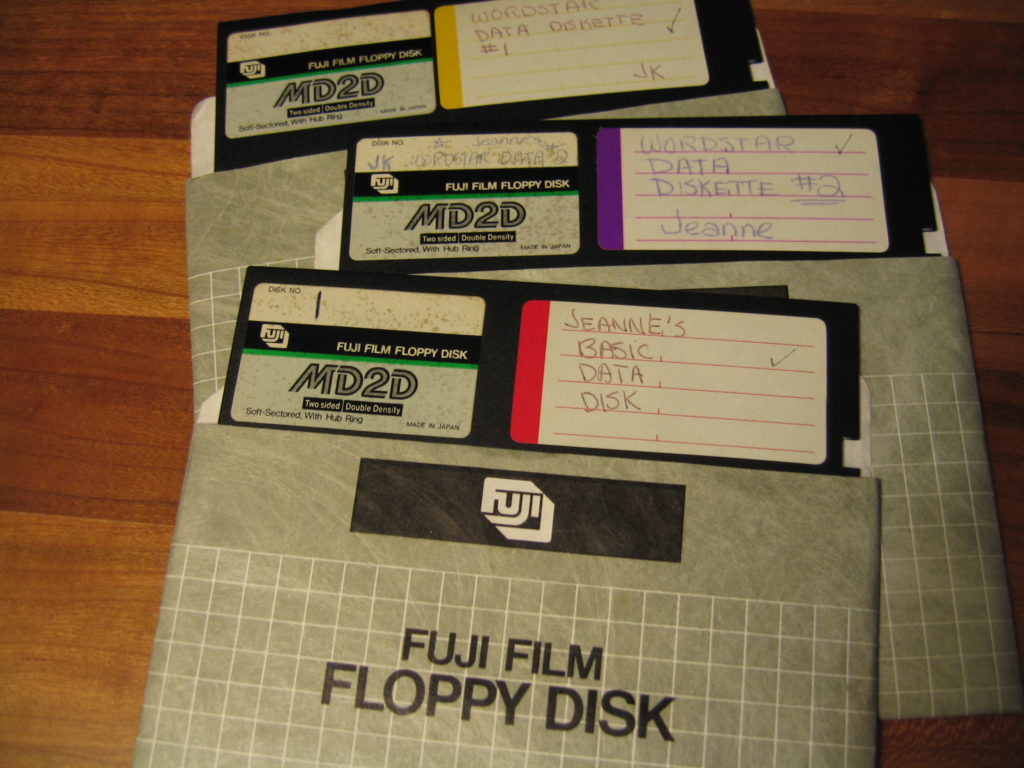
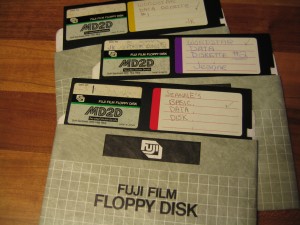
This post is a careful log of how I rescued data trapped on 5 1/4″ floppy disks, some dating back to 1984 (including those pictured here). While I have tried to make this detailed enough to help anyone who needs to try this, you will likely have more success if you are comfortable installing and configuring hardware and software.

I will break this down into a number of phases:

  • Phase 1: Hardware
  • Phase 2: Pull the data off the disk
  • Phase 3: Extract the files from the disk image
  • Phase 4: Migrate or Emulate

Phase 1: Hardware

Before you do anything else, you actually need a 5.25″ floppy drive of some kind connected to your computer.  I was lucky – a friend had a floppy drive for us to work with. If you aren’t that lucky, you can generally find them on eBay for around $25 (sometimes less). A friend had been helping me by trying to connect the drive to my existing PC – but we could never get the communications working properly. Finally I found Device Side Data’s 5.25″ Floppy Drive Controller which they sell online for $55. What you are purchasing will connect your 5.25 Floppy Drive to a USB 2.0 or USB 1.1 port. It comes with drivers for connection to Windows, Mac and Linux systems.

If you don’t want to mess around with installing the disk drive into our computer, you can also purchase an external drive enclosure and a tabletop power supply. Remember, you still need the USB controller too.

Update: I just found a fantastic step-by-step guide to the hardware installation of Device Side’s drive controller from the Maryland Institute for Technology in the Humanities (MITH), including tons of photographs, which should help you get the hardware install portion done right.

Phase 2: Pull the data off the disk

The next step, once you have everything installed, is to extract the bits (all those ones and zeroes) off those floppies. I found that creating a new folder for each disk I was extracting made things easier. In each folder I store the disk image, a copy of the extracted original files and a folder named ‘converted’ in which to store migrated versions of the files.

Device Side provides software they call ‘Disk Image and Browse’. You can see an assortment of screenshots of this software on their website, but this is what I see after putting a floppy in my drive and launching USB Floppy -> Disk Image and Browse:
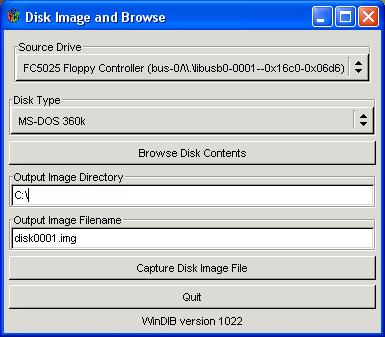
You will need to select the ‘Disk Type’ and indicate the destination in which to create your disk image. Make sure you create the destination directory before you click on the ‘Capture Disk File Image’ button. This is what it may look like in progress:
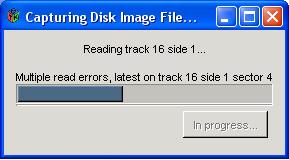
Fair warning that this won’t always work. At least the developers of the software that comes with Device Side Data’s controller had a sense of humor. This is what I saw when one of my disk reads didn’t work 100%:
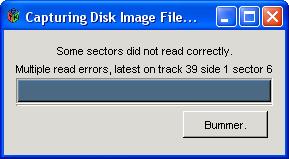
If you are pressed for time and have many disks to work your way through, you can stop here and repeat this step for all the disks you have on hand.

Phase 3: Extract the files from the disk image

Now that you have a disk image of your floppy, how do you interact with it? For this step I used a free tool called Virtual Floppy Drive. After I got this installed properly, when my disk image appeared, it was tied to this program. Double clicking on the Floppy Image icon opens the floppy in a view like the one shown below:
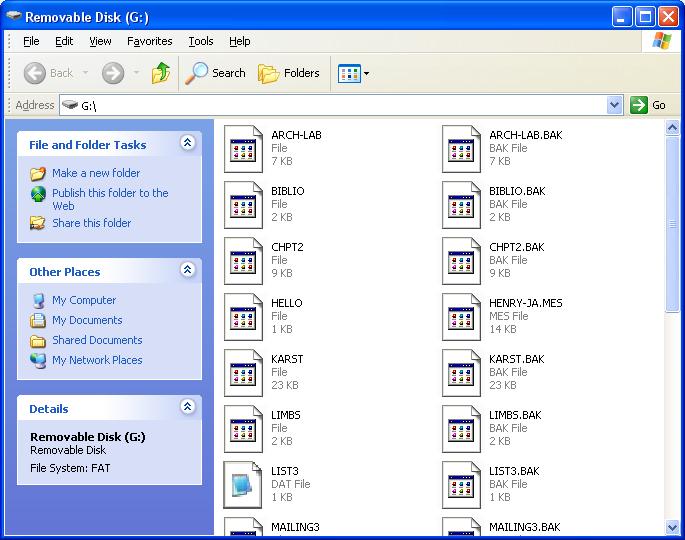
It looks like any other removable disk drive. Now you can copy any or all of the files to anywhere you like.

Phase 4: Migrate or Emulate

The last step is finding a way to open your files. Your choice for this phase will depend on the file formats of the files you have rescued. My files were almost all WordStar word processing documents. I found a list of tools for converting WordStar files to other formats.

The best one I found was HABit version 3.

It converts Wordstar files into text or html and even keeps the spacing reasonably well if you choose that option. If you are interested in the content more than the layout, then not retaining spacing will be the better choice because it will not put artificial spaces in the middle of sentences to preserve indentation. In a perfect world I think I would capture it both with layout and without.

Summary

So my rhythm of working with the floppies after I had all the hardware and software installed was as follows:

  • create a new folder for each disk, with an empty ‘converted’ folder within it
  • insert floppy into the drive
  • run DeviceSide’s Disk Image and Browse software (found on my PC running Windows under Start -> Programs -> USB Flopy)
  • paste the full path of the destination folder
  • name the disk image
  • click ‘Capture Disk Image’
  • double click on the disk image and view the files via vfd (virtual floppy drive)
  • copy all files into the folder for that disk
  • convert files to a stable format (I was going from WordStar to ASCII text) and save the files in the ‘converted’ folder

These are the detailed instructions I tried to find when I started my own data rescue project. I hope this helps you rescue files currently trapped on 5 1/4″ floppies. Please let me know if you have any questions about what I have posted here.

Update: Another great source of information is Archive Team’s wiki page on Rescuing Floppy Disks.

SXSWi: You’re Dead, Your Data Isn’t: What Happens Now?

This five person panel at SXSW Interactive 2011 tackled a broad range of issues related to what happens to our online presence, assets, creations and identity after our death.

Presenters:

There was a lot to take in here. You can listen to the full audio of the session or watch a recording of the session’s live stream (the first few minutes of the stream lacks audio).

A quick and easy place to start is this lovely little video created as part of the promotion of Your Digital Afterlife – it gives a nice quick overview of the topic:

Also take a look at the Visual Map that was drawn by Ryan Robinson during the session – it is amazing! Rather than attempt to recap the entire session, I am going to just highlight the bits that most caught my attention:

Laws, Policies and Planning
Currently individuals are left reading the fine print and hunting for service specific policies regarding access to digital content after the death of the original account holder. Oklahoma recently passed a law that permits estate executors to access the online accounts of the recently deceased – the first and only state in the US to have such a law. It was pointed out during the session that in all other states, leaving your passwords to your loved ones is you asking them to impersonate you after your death.

Facebook has an online form to report a deceased person’s account – but little indication of what this action will do to the account. Google’s policy for accessing a deceased person’s email requires six steps, including mailing paper documents to Mountain View, CA.

There is a working group forming to create model terms of service – you can add your name to the list of those interested in joining at the bottom of this page.

What Does Ownership Mean?
What is the status of an individual email or digital photo? Is it private property? I don’t recall who mentioned it – but I love the notion of a tribe or family unit owning digital content. It makes sense to me that the digital model parallel the real world. When my family buys a new music CD, our family owns it – not the individual who happened to go to the store that day. It makes sense that an MP3 purchased by any member of my family would belong to our family. I want to be able to buy a Kindle for my family and know that my son can inherit my collection of e-books the same way he can inherit the books on my bookcase.

Remembering Those Who Have Passed
How does the web change the way we mourn and memorialize people? Many have now had the experience of learning of the passing of a loved one online – the process of sorting through loss in the virtual town square of Facebook. How does our identity transform after we are gone? Who is entitled to tag us in a photo?

My family suffered a tragic loss in 2009 and my reaction was to create a website dedicated to preserving memories of my cousin. At the Casey Feldman Memories site, her friends and family can contribute memories about her. As the site evolved, we also added a section to preserve her writing (she was a journalism student) – I kept imagining the day when we realized that we could no longer access her published articles online. I built the site using Omeka and I know that we have control over all the stories and photos and articles stored within the database.

It will be interesting to watch as services such as Chronicle of Life spring up claiming to help you “Save your memories FOREVER!”. They carefully explain why they are a trustworthy digital repository and why they backup their claims with a money-back guarantee.

For as little as $10, you can preserve your life story or daily journal forever: It allows you to store 1,000 pages of text, enough for your complete autobiography. For the same amount, you could also preserve less text, but up to 10 of your most important photos. – Chronicle of Life Pricing

Privacy
There are also some interesting questions about privacy and the rights of those who have passed to keep their secrets. Facebook currently deletes some parts of a profile when it converts it to a ‘memorial’ profile. They state that this is for the privacy of the original account holder. If users are ultimately given more power over the disposition of their social web presence – should these same choices be respected by archivists? Or would these choices need to be respected the way any other private information is guarded until some distant time after which it would then be made available?

Conculsion
Thanks again to all the presenters – this really was one of the best sessions for me at SXSWi! I loved that it got a whole different community of people thinking about digital preservation from a personal point of view. You may also want to read about Digital Death Day – one coming up in May 2011 in the San Francisco Bay Area and another in September 2011 in the Netherlands.

Image credit: Excerpt from Ryan Robinson’s Visual Map created live during the SXSW session.

Leveraging Google Reader’s Page Change Tracking for Web Page Preservation

The Official Google Reader Blog recently announced a new feature that will let users watch any page for updates. The way this works is that you add individual URLs to your Google Reader account. Just as with regular RSS feeds, when an update is detected – a new entry is added to that subscription.

My thinking is that this could be a really useful tool for archivists charged with preserving websites that change gradually over time, especially those fairly static sites that change infrequently with little or no notice of upcoming changes. If a web page was archived and then added to a dedicated Google Reader account, the archivist could scan their list of watch pages daily or weekly. Changes could then trigger the creation of a fresh snapshot of the site.

I will admit that there have been services out there for a while that do something similar to what Google has just rolled out. I personally have used Dapper.net to take a standard web page and generate an RSS feed based on updates to the page (sound familiar?). One Dapper.net feed that I created and follow is for the news archive page for the International Red Cross and can be found here. What is funny is that now they actually have an official RSS feed for their news that includes exactly what my Dapper.net feed harvested off their news archive page – but when I built that Dapper feed there was no other way for me to watch for those news updates.

There are lots of different tools out there that aim to archive websites. Archive-It is a subscription based service run by Internet Archive that targets institutions and will archive sites on demand or on a regular schedule. Internet Archive also has an open source crawler called Heritrix for those who are comfortable dealing with the code. Other institutions are building their own software to tackle this too. Harvard University has their own Web Archive Collection Service (WAX). The LiWA (Living Web Archives) Project is based in Germany and aims to “extend the current state of the art and develop the next generation of Web content capture, preservation, analysis, and enrichment services to improve fidelity, coherence, and interpretability of web archives.” One could even use something as simple as PDFmyURL.com – an online service that turns any URL into a PDF (be sure to play with the advanced options to make sure you get a wide enough snapshot). I know there are many more possibilities – these just scratch the surface.

What I like about my idea is that it isn’t meant to replace these services but rather work in tandem with them. The Internet Archive does an amazing job crawling and archiving many web pages – but they can’t archive everything and their crawl frequency may not match up with real world updates to a website. This approach certainly wouldn’t scale well for huge websites for which you would need to watch for changes on many pages. I am picturing this technique as being useful for small organizations or individuals who just need to make sure that a county government website makeover or a community organization’s website update doesn’t get lost in the shuffle. I like the idea of finding clever ways to leverage free services and tools to support those who want to protect a particular niche of websites from being lost.

Image Credit: The RSS themed image above is by Matt Forsythe.

Blog Action Day 2009: IEDRO and Climate Change

IEDRO LogoIn honor of Blog Action Day 2009‘s theme of Climate Change, I am revisiting the subject of a post I wrote back in the summer of 2007: International Environmental Data Rescue Organization (IEDRO). This non-profit’s goal is to rescue and digitize at risk weather and climate data from around the world. In the past two years, IEDRO has been hard at work. Their website has gotten a great face-lift, but even more exciting is to see is how much progress they have made!

  • Weather balloon observations received from Lilongwe, Malawi (Africa) from 1968-1991: all the red on these charts represents data rescued by IEDRO — an increase from only 30% of the data available to over 90%.
  • Data rescue statistics from around the world

They do this work for many reasons – to improve understanding of weather patterns to prevent starvation and the spread of disease, to ensure that structures are built to properly withstand likely extremes of weather in the future and to help understand climate change. Since the theme for the day is climate change, I thought I would include a few excerpts from their detailed page on climate change:

“IEDRO’s mandate is to gather as much historic environmental data as possible and provide for its digitization so that researchers, educators and operational professionals can use those data to study climate change and global warming. We believe, as do most scientists, that the greater the amount of data available for study, the greater the accuracy of the final result.

If we do not fully understand the causes of climate change through a lack of detailed historic data evaluation, there is no opportunity for us to understand how humankind can either assist our environment to return to “normal” or at least mitigate its effects. Data is needed from every part of the globe to determine the extent of climate change on regional and local levels as well as globally. Without these data, we continue to guess at its causes in the dark and hope that adverse climate change will simply not happen.”

So, what does this data rescue look like? Take a quick tour through their process – from organizing papers, photographing each page, the transcription of all data and finally upload of this data to NOAA’s central database. These data rescue efforts span the globe and take the dedicated effort of many volunteers along the way. If you would like to volunteer to help, take a look at the IEDRO listings on VolunteerMatch.